
Smart home sensors are small devices that monitor specific conditions inside a home and send alerts when something changes.
They can detect things like water leaks, temperature changes, open doors, or motion in areas that are usually quiet.
The goal isn’t to make a home more complicated. Instead, these systems help catch small problems early — often before they become larger and more expensive ones.
For homeowners who are new to smart sensors, the systems can seem confusing at first. Once you understand the basic pieces, most setups are actually quite simple.
What a Smart Sensor System Is
Most smart sensor systems include three main parts:
• a hub
• one or more sensors
• a mobile app
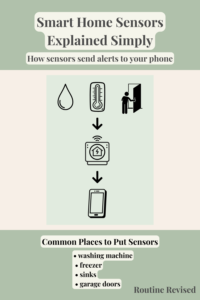
Sensors monitor specific conditions such as water, temperature, or movement. When something changes, the sensor sends a signal to the hub.
The hub then sends that information through your internet connection to the system’s mobile app, which sends an alert to your phone.
This allows homeowners to receive notifications even when they are away from home.
A typical smart sensor system works like this:
What Smart Sensors Can Do
Different sensors are designed to monitor different situations around the home.
Some of the most common uses include:
Water Leak Detection
Water leak sensors are often placed near areas where plumbing failures can happen.
Common locations include:
• washing machines
• water heaters
• sinks
• toilets
These sensors detect water where it shouldn’t be and send alerts before a small leak becomes serious damage.
Water leaks are one of the most common problems sensors are used for.
Learn more about the quiet plumbing failure many homes miss.
Temperature Monitoring
Temperature sensors are often used in places where changes could cause problems.
Examples include:
• freezers
• garage refrigerators
• basements
• vacation homes
Temperature sensors can send alerts if temperatures rise unexpectedly, helping prevent food loss or equipment damage.
Many homeowners place sensors in freezers or garage refrigerators to prevent unexpected food loss.
Learn how freezer alarms can warn you before food spoils.
Door and Window Monitoring
Door and window sensors detect when a door or window opens.
Common places to use them include:
• garages
• sheds
• entry doors
These sensors can help monitor areas of the home that are used less frequently.
Motion Detection
Motion sensors detect movement in areas where activity is usually limited.
Examples include:
• basements
• garages
• storage rooms
These sensors can provide alerts when unexpected movement occurs.
These are some of the most common basic uses for smart sensor systems today. Many systems also offer additional add-ons and accessories, allowing homeowners to expand the system over time with more types of sensors or smart home features.
What You Need to Start
Most smart sensor systems are easy to begin with.
A typical starter setup includes:
• one hub
• one or two sensors
• a mobile app for alerts
Many homeowners start with a single sensor, such as a freezer temperature sensor or a water leak sensor near the washing machine, and add more sensors later if needed.
Power Source: How Smart Sensors Are Powered
Smart sensor systems typically use a combination of battery-powered sensors and a plug-in hub.
Understanding how each part is powered helps homeowners know what to expect if the power goes out.
Sensors
Most sensors run on small batteries rather than being plugged into an outlet. This allows them to be placed almost anywhere in the home.
Examples include:
• water leak sensors
• temperature sensors
• door and window sensors
• motion sensors
Battery-powered sensors are designed to use very little power, and many batteries last months or even years before needing replacement.
Because they are wireless, sensors can easily be placed under appliances, inside cabinets, or near plumbing connections.
Hubs
The hub is the device that connects sensors to your phone.
Most hubs plug into a wall outlet and connect to your internet router through Wi-Fi or an Ethernet cable.
The hub acts as the central communication point for all sensors in the system.
What Happens if the Power Goes Out
Because most sensors run on batteries, they usually continue monitoring conditions during a power outage.
However, if the hub loses power, it may temporarily stop sending alerts until power is restored.
Some homeowners connect their hub and internet router to a small battery backup power supply (UPS) so alerts can still be sent during short outages.
Different Setup Options
Smart sensor systems can be used in several ways depending on what a homeowner wants to monitor.
Basic Setup
A hub with one or two sensors.
Common examples include:
• freezer temperature monitoring
• leak detection near washing machines
Expanded Setup
Several sensors placed in different parts of the home.
Examples include:
• leak sensors near plumbing connections
• temperature sensors in refrigerators or freezers
• door sensors for garages or sheds
Whole-Home Monitoring
Some homeowners gradually add sensors throughout the home.
This might include:
• multiple leak sensors
• door sensors
• motion sensors
• temperature monitoring
Because most systems are modular, sensors can be added over time as needed.
What to Look for When Comparing Systems
If you are considering a smart sensor system, a few factors can make a difference.
Range
Some systems work better in larger homes or areas like basements and garages where signals need to travel farther.
Battery Life
Sensors powered by longer-lasting batteries require less maintenance.
Ease of Setup
Many systems are designed to be installed quickly through a mobile app.
Expandability
Some systems allow homeowners to add many different types of sensors over time.
Choosing a system that supports additional sensors can make it easier to expand the setup later as needs change.
Must-Have Sensors Many Homes Start With
Many homeowners begin with sensors that help monitor the most common household problems.
These often include:
• water leak sensors
• freezer or refrigerator temperature sensors
• door sensors for garages
Starting with one or two sensors can make it easier to learn how the system works before adding more devices.
Optional Add-Ons
Once a system is installed, additional sensors can expand its usefulness.
Some examples include:
• motion sensors
• humidity sensors
• smart outlets
• additional leak detectors
Because these systems are modular, homeowners can add sensors over time as their needs change.
Gigi Says
Many home problems begin quietly, long before anyone notices them.
Smart sensors don’t prevent problems entirely, but they can provide an early alert when something changes.
Sometimes a simple notification is enough to turn a potential emergency into a small repair.